.png?width=300&height=76&name=logo%20H%20teal%20(1).png)
Adding more users and administrators
Once you have logged into TicketCo, the first thing you may want to do is add your staff as new users, or as we call them, managers, on your account. You can also easily do this as and when required.
Primary Contacts
Note that only Primary Contacts on the account can create and manage other users. Primary contacts are marked with a key-icon, and there will only be one primary contact per account. Be careful not to give away this permission to other users when setting them up in the platform.
Creating new managers
To create a new user or manager, click on Organizer settings in the menu at the top, then select the Managers tab found to the lefthand side. Select the yellow Create New Manager button, and you will see a screen like this.
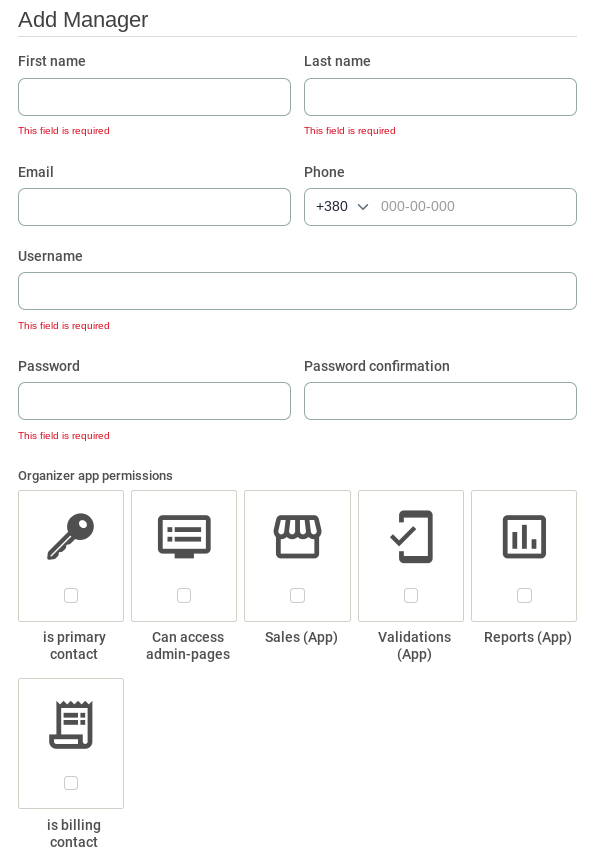
The fields you must fill in to create a new user are:
First & Last Name
This may be the name of the person accessing the user, or it can be something generic such as "Ticket Sales 1".
The user's email address. Note that the email address registered here will be used whenever sending out messages via Contact attendees - more info on that here.
Phone Number
The user's phone number. This field is not obligatory, but can be useful in case TicketCo needs to contact a user.
Username
This is the username that will be used to log in to the TicketCo-app or admin pages. Generally speaking, it is easiest to set the user's email address as their username. Note that every username must be unique, so if you have multiple TicketCo accounts, you will need multiple usernames.
Password
This is the password you use to log in to the TicketCo-app or admin pages. Remember to send the username and password to the user once created.
Manager permissions
Once you have filled in the fields described above, you can assign permissions to the users:
|
Primary Contact | There can only be one primary contact person per organiser account. This is the only person who can change and add other users, cancel events and they are also the user TicketCo will contact if we have any questions. (We recommend that you do not to change this). |
|
Can access admin pages | The user will be able to log on to ticketco.events and create/manage events and retrieve reports. |
|
Sales | This decides if the user is allowed to sell items in the TicketCo-app. |
|
Validations | This decides if the user is allowed to scan tickets with the TicketCo-app. |
|
Reports | This decides if the user can gain access to the reports in the TicketCo-app. |
 |
Is billing contact | This decides if the user will receive automatic invoices and have access to the Billing tab. This can be useful for your accountant, and you can read more about this here. |