.png?width=300&height=76&name=logo%20H%20teal%20(1).png)
Customising your branding further
This article is designed for users who have are experienced with web design, graphic design or digital marketing; or those who are already quite familiar with our Branding feature. If you are new to this feature, please read this article first. To get access to the module, please get in touch.
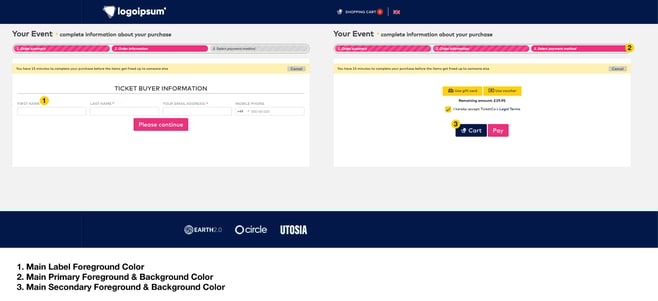
Once activated, you will find the module under Organiser settings in the main menu. Here you can see an example of what can be achieved with the branding. You can use branding to customise your organiser page, event pages, tickets and streaming page.
Click images to enlarge.
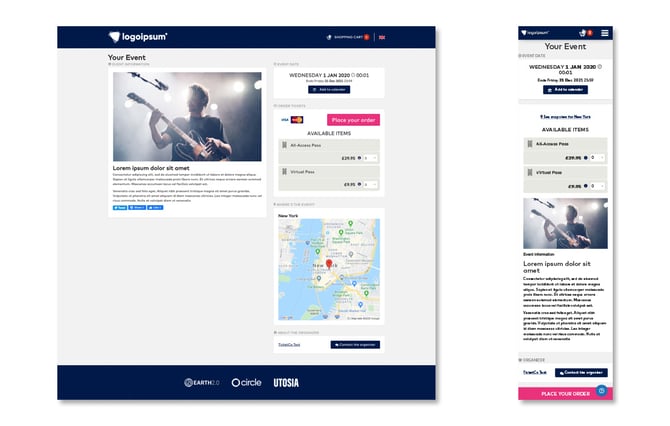
Event page
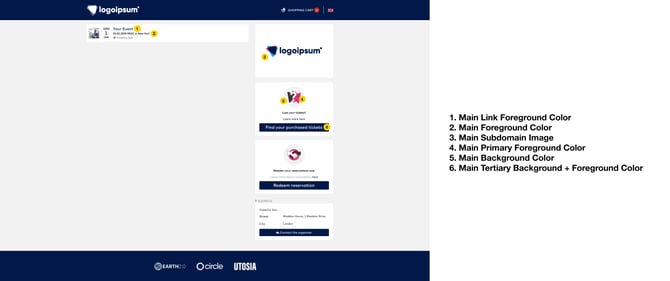
Organisation domain
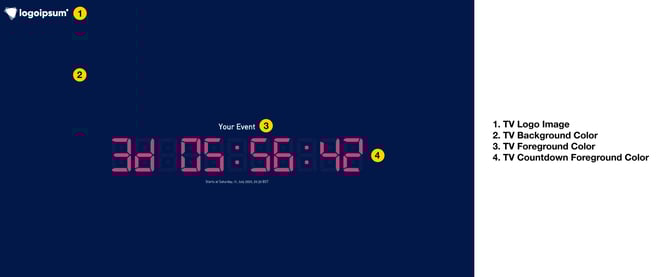
TicketCo Media Services
Checkout
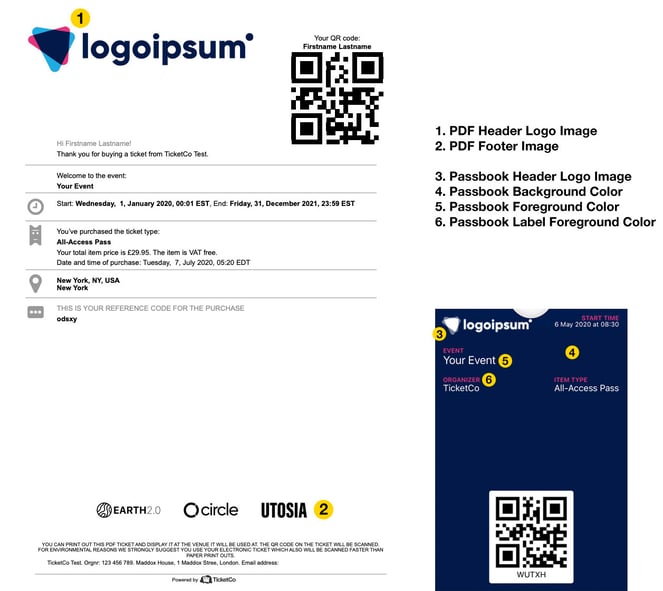
PDF / Wallet
What image types, resolutions and fonts are supported?
For a more in-depth look at which file types and sizes are supported, please use the Complete branding index which you will also find in this help section.
Site Favicon
Supported: .ICO / .PNG / .JPG
Recommended: .ICO
Maximum width: 64px
Maximum height: 64px
Header Logo Image
Supported: .SVG / .PNG / .JPG
Recommended: .SVG
Maximum width: 900px
NB! You should ensure to fill out Header Logo Height field. If not filled out, 80px will be set as the default height.
Header Center Image
Supported: .SVG / .PNG / .JPG
Recommended: .SVG
Maximum width: 900px
Header Mobile Logo Image
Supported: .SVG / .PNG / .JPG
Recommended: .SVG
Maximum width: 33px
Maximum height: 170px
Main Subdomain Image
Supported: .PNG / .JPG
Recommended: Both .PNG and .JPG
Maximum width: 370px
Maximum height: 170px
Main Background Image
Supported: .PNG / .JPG
Recommended: Both .PNG and .JPG
NB! There is no maximum width or height but site loading speed is heavily affected by the quality and size of the picture. A high-quality picture will most likely significantly increase the loading time on your pages.
Footer Hero Image
Supported: .PNG / .JPG
Recommended: Both .PNG and .JPG
Maximum width: 1170px
PDF Header Image
Supported: .PNG / .JPG
Recommended: Both .PNG and .JPG
Recommended maximum width: 430px
Recommended maximum height: 170px
NB! Image size might be automatically resized to fit.
PDF Footer Image
Supported: .PNG / .JPG
Recommended: Both .PNG and .JPG
Recommended maximum width: 700px
Recommended maximum height: 90px
NB! Image size might be automatically resized to fit.
Passbook Header Logo Image
Supported: .PNG / .JPG
Recommended: .PNG
Maximum width: 480px
Maximum height: 150px
NB! The logo must be 480px by 150px. If it deviates from this size, the logo will not appear correctly.
TicketCo TV Logo Image
Supported: .PNG / .JPG
Recommended: Both .PNG and .JPG
Maximum width: 400px
Maximum height: 100px
Fonts
Supported: .TTF / .OTF
Recommended: Both .TTF and .OTF
Top tips
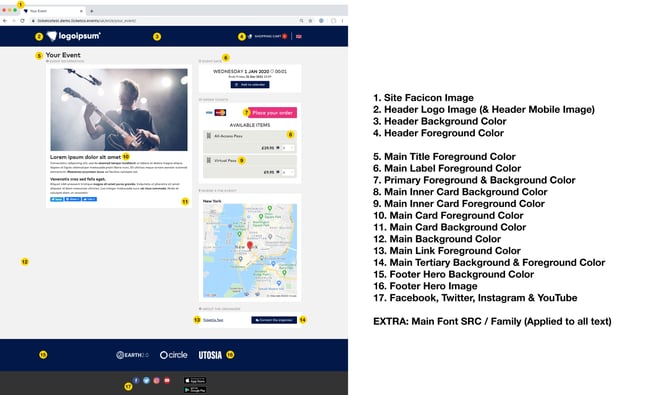
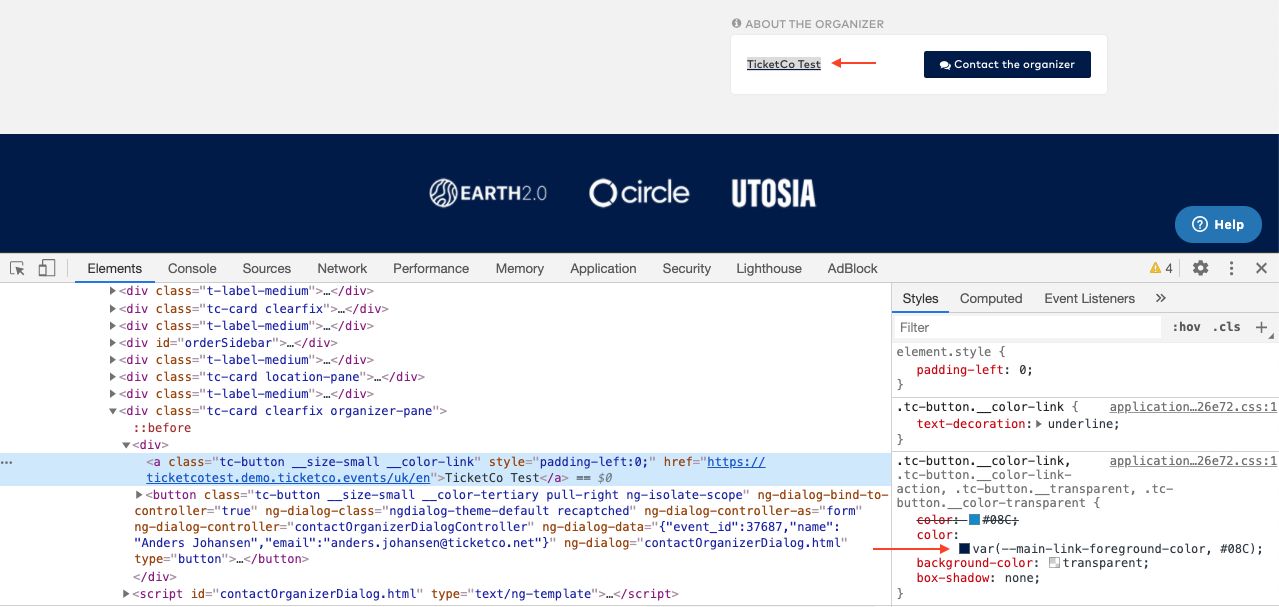
Inspect tool
Use the web inspector tool to identify the name of the element you want to brand, as shown in the image here:
Create a free ticket
If you are able to do so, create a free ticket in an event, perhaps hidden with a promo code, and go through the whole purchase journey in order to test out your branding.
Mobile
Remember to also make sure that the mobile version of the branding is in line with what you have in mind. You might need to adjust your branding settings to accommodate the mobile view, as it can differ from the desktop view.