.png?width=300&height=76&name=logo%20H%20teal%20(1).png)
Dividing season tickets into individual coupons
If you have a sponsor who is entitled to a certain number of season tickets per season, typically they may share this internally amongst their staff or employees. To assist with this, you can select to "couponise" a season ticket (or an order containing multiple season tickets) so that your sponsor can send out individual tickets to their staff instead of a sharing the same season ticket QR-code. This article will explain what couponisation is, how it works and where to find it.
Dividing a season ticket into coupons
"Couponising" lets you divide a season ticket into a group of individual event tickets or match tickets, meaning your sponsor or partner can easily share out tickets amongst their employees. Often this is something your B2B or partnership team would manage. When you decide to couponise a season ticket, this will immediately invalidate the season ticket QR-code i.e. your sponsor should not use this at the game.
Where do I find this?
You must first have registered a season ticket sale which is saved under Admin sales or Report on your season ticket event. Typically, this will be an invoice sale registered in Admin sales. Find the ticket or order under the Report or Admin sales page, and select the Settings drop-down:
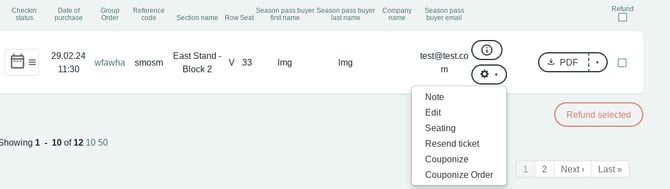
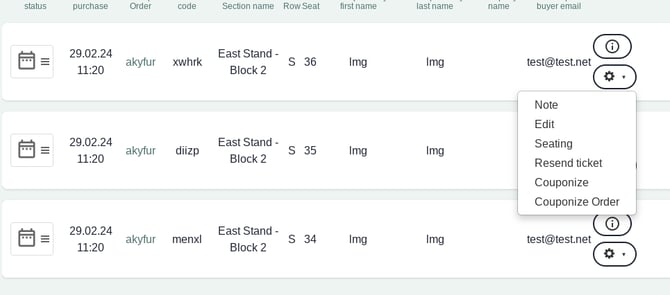
You can now choose to either Couponise the individual season ticket as shown above, or the whole order - Couponise Order - as shown here:
Distributing coupons
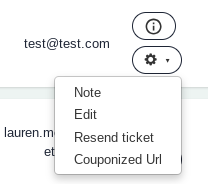
When you select Couponise or Couponise Order, you will get access to a link which you can share directly with the sponsor. Select Couponised Url to view the link:
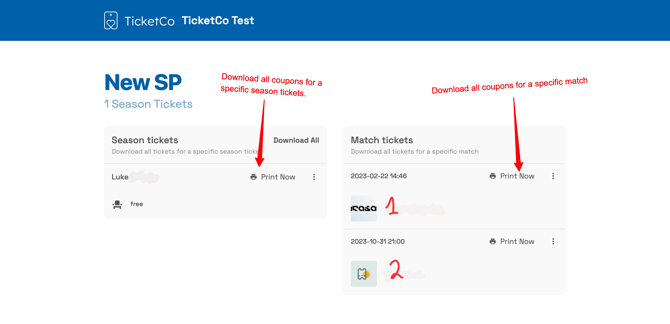
This coupons page sorts the individual tickets in two different ways, allowing your sponsor to use that which is most appropriate for them:
Grouped by seat/ticket
On the left-hand side, you will see a list of all the couponised season tickets, sorted according to the seat. That is to say if you had couponised an order of 10 season tickets on Row A, seats 12-22, then you would be able to download a PDF containing all match day tickets for seat 12, seat 13, seat 14 etc.
Grouped by match
On the right side of the page, you will see a list of individual events or matches. This is marked in the above image with "1" and "2". This means you can select to download all tickets (meaning all seats for Row A, 12-22) for game 1, and then for game 2 separately. Note that ended events will not display in this list.
Sorting the groups
Put simply, Match tickets PDFs are sorted by event date, whilst Season tickets PDFs are sorted by section, then row, then seat. Note that only upcoming matches will be shown on this page.
Important information
Please note that once you have selected to couponise a season ticket, this cannot be undone. The season ticket QR-code becomes invalid immediately, so if you have done this by mistake, you should consider cancelling the order and starting again.
If you do not have all your matches associated to your season ticket when you need to couponise the items, do not worry! The link will update automatically with new matches as you assign them to your season ticket. As you progress through the season, ended events will be removed from the list of match tickets, so that only upcoming games display there. It may be worth informing your sponsor of this in advance.
Any further questions? Do not hesitate to get in touch with support.