.png?width=300&height=76&name=logo%20H%20teal%20(1).png)
How to deal with refunds
Once you have started selling tickets, you might find that some ticket buyers request a refund or wish to exchange tickets if they purchased something incorrectly.
Which items can be refunded by you?
- Free tickets
- Tickets sold via admin / on-site sales and registered as settlement type "cash"
- Tickets sold via admin sales and registered as settlement type "invoice"
Registering these tickets as "refunded" means that your reports will be correct, and the tickets will automatically be made available for resale. In these cases, no payment will have been processed in our platform, so you will have to handle any refunds to your customers directly.
How to register an item as refunded
Registering an item as "refunded" in the platform has the following consequences:
- The item will be made invalid, meaning that it will not be scannable. If someone tries to scan an invalid ticket, an error message will show in the admin app.
- For an event without a seat map, the ticket will be removed from the capacity so that you can still sell your max number of tickets. For an event with a seat map, the relevant seat will be made available for sale again.
- The item will not be counted in any event reports.
You can do this by:
- Navigating to the relevant event in the platform
- Selecting Report
- Finding the tickets in the report page (by using the search bar or browsing the list)
- Selecting the checkbox under the Refund column
- Clicking Refund selected at the bottom of the page
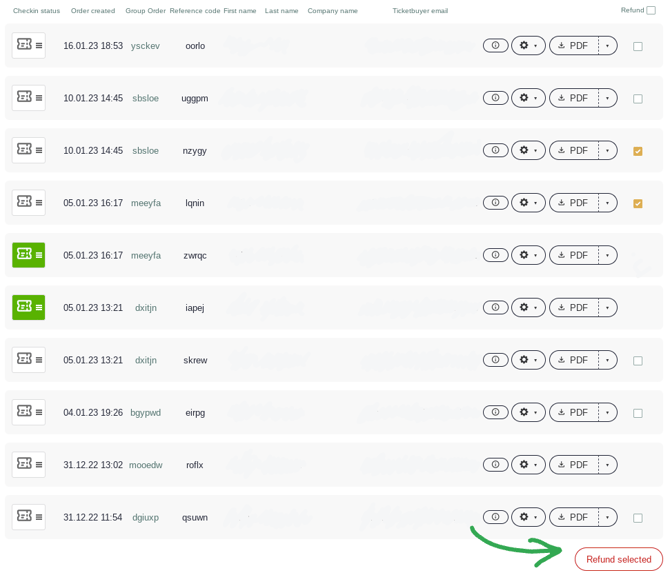
Note that tickets must be checked out before this check box becomes available.
What items must be refunded by Ticketco?
There are some items which you will not be able to refund yourself, Our support team will be able to assist you with these. TicketCo is largely able to refund items purchased with a credit card via our website or Wallet app, if we have not yet settled any funds with you. Further details are outlined below:
Which items cannot be refunded by you?
Items sold via our website or Wallet app which have been paid for with a credit card:
- TicketCo will have to refund these items on your behalf, so send us an email including the ticket reference number, email address of the purchaser, and event name, and we will assist you.
- If we have not yet settled any funds with you, and the event has not yet occurred, we should be able to assist you by refunding your customer.
Items sold over the counter via a Zettle card reader:
- These tickets unfortunately cannot be refunded through our system, so you should settle the refund manually with the customer directly.
- Send us an email with the reference code of the ticket, and we will help you invalidate the ticket.
Items sold (fully or partially) with a gift card, voucher or click card:
- As these types of transaction will have bypassed our payment provider, there will not be an original purchase which we are able to refund unfortunately.
- We therefore kindly ask that you refund the customer directly, and you may have to manually increase your event's capacity in order to compensate for the refunded ticket.
Any questions?
Don't hesitate to get in contact with us if you have any questions surrounding refunds or how to register an item as refunded.