.png?width=300&height=76&name=logo%20H%20teal%20(1).png)
Sending tickets by SMS
Ticket buyers can choose to receive their tickets by SMS as well as by email. SMS delivery is an optional, paid add-on that the buyer selects at checkout. Email delivery is still free. In this article we explain how paid SMS works, what it costs, and how you can change the price. S
How paid SMS works
Since 7 October 2026, SMS delivery is an optional add-on for all organisers on TicketCo. It is switched off by default at checkout. If a ticket buyer wants their tickets by SMS, they must choose it themselves when they buy.
- The ticket buyer pays the SMS price at checkout, on top of the ticket price.
- TicketCo charges you a fixed fee per SMS (see the table below). The rest of the SMS price goes to you.
- Email delivery is free, as before. Every buyer still gets their tickets by email.
- Only online sales are affected. Admin sales and POS (the TicketCo app) work as they did before.
You don't need to do anything to start. Paid SMS is already active on your account. You only need to act if you want to change the price or the text.
Note: If you were already using paid SMS before 7 October, nothing changes for you.
The SMS price
Every account starts with a default SMS price for its country. TicketCo's fee per SMS is deducted from that price, and you keep the difference.
|
Country |
Default price paid by the buyer |
TicketCo fee per SMS |
Your share at the default price |
|
Norway |
10 NOK |
3 NOK + VAT |
the difference |
|
Sweden |
10 SEK |
3 SEK + VAT |
the difference |
|
Ireland |
€1 |
€0.30 + VAT |
the difference |
|
United Kingdom |
£1 |
£0.30 + VAT |
the difference |
Changing the SMS price and text
You can set your own SMS price and change the text the buyer sees at checkout. Both settings are in your account settings.
- Log in to TicketCo admin.
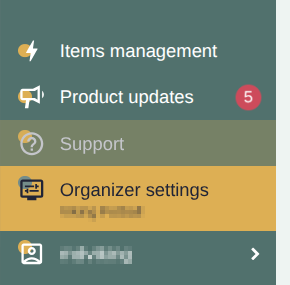
- Go to Account settings -> Organisers Settings -> Account Setup
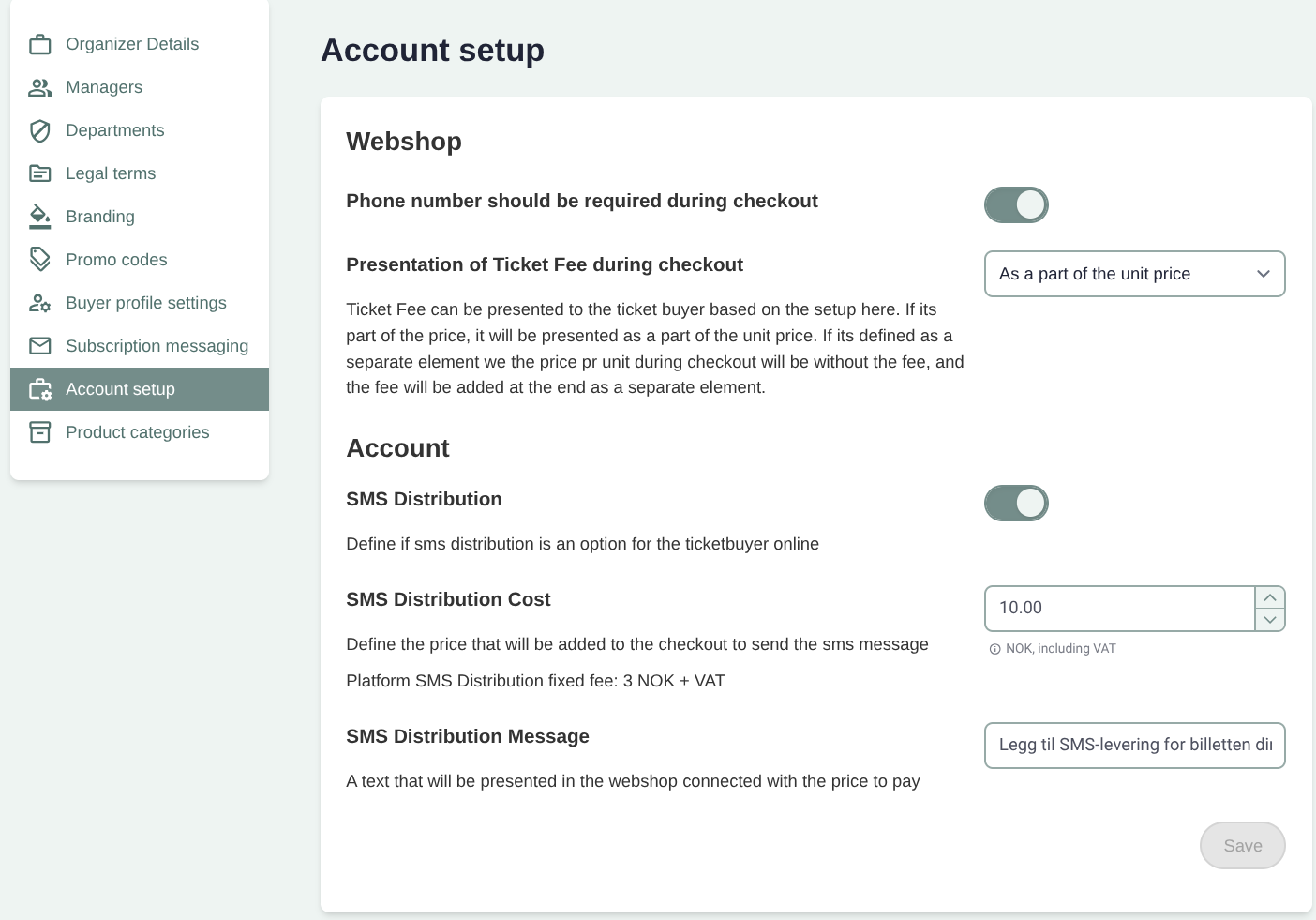
- Enter your new SMS price (included VAT).
- Change the checkout text for SMS if you want to.
- Click Save
The new price applies to purchases made immediately after you save. The price is set for your whole account The SMS Settings is for the whole account, so not per ticket type or event level.
If you decide to set the price to 0 the TicketCo fee per sms still applies. Please note that this may mean negative balance that has to be covered.
Disable SMS
You can disable sms by turning off SMS distribution
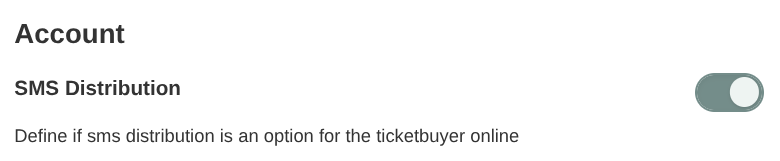
Once the sms is disabled this distribution option would not be possible.
What your ticket buyers receive
At checkout, the buyer sees the SMS option with your price and your text. SMS is not selected by default:
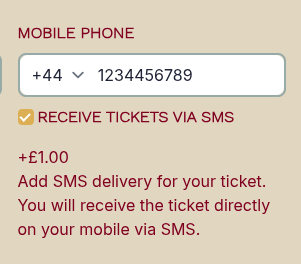
If the buyer selects SMS and enters their mobile number, they receive an SMS with their ticket reference code and a link to their ticket. At the event they open the link and show the QR code to be scanned. They also receive their tickets by email, as always.
Buyers who don't select SMS get their tickets by email only.
Note: One SMS is sent per ticket, not per order. A buyer who orders four tickets will receive four SMS. The buyer pays once per order.
You can read more about how buyers find their tickets in How do I access my tickets on my phone?.
VAT, settlement and invoice
VAT on the SMS price: the SMS your buyer pays for has the same VAT rate as the ticket it is bought with.
Settlement: the SMS income is paid out to you with your regular settlement, together with your ticket sales Read more in Your settlement.
Invoice: TicketCo's fee per SMS (plus VAT) is shown on your invoice, and the SMS charge is shown on the buyer's order. Read more in Understanding your invoice.
Reporting: The sms items will be visible in the reporting section as a separate item called sms.
Frequently asked questions
Do I need to do anything to activate paid SMS?
No. Paid SMS was switched on for all organisers on 7 October 2026. You only need to act if you want to change the price or the checkout text.
Does this change admin sales or sales in the TicketCo app?
No. Only online sales to ticket buyers are affected. Admin sales and POS work as before.
A buyer paid for SMS but didn't receive it. What should they do?
The tickets are always sent by email too, so ask the buyer to check their inbox and spam folder. They can also get their tickets again through "Find my purchased tickets" on the TicketCo website. If the SMS still hasn't arrived, contact support with the order reference.
A buyer entered the wrong phone number. Can the SMS be sent again?
No. The buyer still has their tickets by email. In case the buyer has not received the tickets they should contact support@ticketco.io
Is the SMS fee refunded when I refund the ticket?
No, the sms delivery method is non-refundable.
My buyers received one SMS for every ticket. Is that right?
Yes. Today one SMS is sent per ticket, not per order.