.png?width=300&height=76&name=logo%20H%20teal%20(1).png)
Getting started with TicketCo
First of all - Welcome!
We are very happy to have you as a customer and want to help you get started as smoothly as possible. This article acts as a quick intro to get you up and running. It will also give you a good overview of the steps you may wish to follow when setting up your first successful event with TicketCo.
Use the search box above, or navigate through the various help sections for further information.
Getting to know TicketCo
It is important to get to know the fundamentals of any new system. Once you've signed up to TicketCo and submitted all your details to us, you should receive a verification email. In this email you'll find a link to confirm your account and create a password.
Please note that we do not recommend activating your account on a mobile device. Use your laptop or desktop computer to confirm your account. If you do not receive this email or experience any issues with signing in please contact us here.
To start using TicketCo all you need is a web browser. While we support most browsers, the latest versions of Google Chrome, Firefox, Safari or Microsoft Edge are recommended. Once you have confirmed your account and created your password, simply go to ticketco.events, select your country and click the Admin button in the top right corner.

TicketCo admin pages
When we talk about the TicketCo admin pages, we are referring to the online tool you use to create your events. It's worth mentioning that TicketCo is a cloud-based system. If you don't know what that means, you can think of all your events the same way you think of your Facebook events. Once you log in and create your events, you can access them from anywhere as long as you have a web browser. When you publish them, they will be made live immediately and if you ever need to make any changes, all you have to do is log on and edit.
Unfortunately, TicketCo Admin is not yet fully available on mobile devices. If you need to access TicketCo Admin from your phone or tablet, you'll have to request the desktop version of ticketco.events and access it in that way.
Creating users for your staff and colleagues
Once you're logged in, the first thing you may want to do is create users for your staff or colleagues who also need access to your organiser account. You will do this under the Organizer settings module, under the Managers .
When does TicketCo pay out my ticket sales?
In general, TicketCo settles funds from your events on the Wednesday following the event end date. Funds will be paid out to the bank account you provided when you signed up, which you will also see recorded under the Organiser settings module. For more information about settlement head this way →
TicketCo logos
You can download and apply our logos to your posters and online materials when marketing your event.
Creating your first event
- Read in detail about creating your first event
- Setting up different ticket types and capacities
- Ordering a seat map for your events
- Applying different discounts to your events
- Reserving tickets for your VIPs or staff
- Registering cash sales and sales of free tickets
- What hardware do I need?
- Applying your own legal terms to the purchase process
- Applying branding
Marketing your event
To link to the event from your website you can either use the link found under Event Details of your event or link to your TicketCo subdomain. Your subdomain will show a list of all your published events:
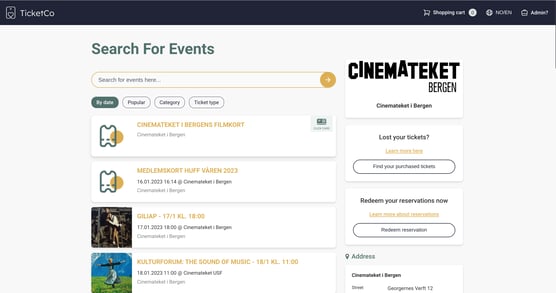
To find your subdomain link simply take the first part of your event link found under Event Details. Alternatively, you can integrate your events in your webpage via:
Hardware and the admin app
Prior to your event taking place, you should ensure you know what kind of hardware and equipment you will need. TicketCo has an admin app which is available for download from Google Play and the App Store, and this is what you can use to scan and sell tickets to your event.
- What equipment do I need?
- How to set up the Zettle card reader on an iOS device?
- How to set up the Zettle card reader on an Android device?
- How to scan tickets in the app?
- How to sell tickets in the app?
- How to connect the Star printer?
Reporting and accounting
- What kind of reports are available?
- Organiser Dashboard
- Event reports
- Multi-event reports
- Updating your bank account number
Helping your ticket buyers
You may receive some questions from your ticket buyers once your events are on sale. We have a section in our help pages which is specifically designed to help ticket buyers and purchasers with some common queries, so feel free to have a browse through the help articles there. You may also be interested in:
- How to register items as refunded
- How to cancel an event
- How to move a ticket buyer's seat
- How to resend a ticket or change the details on an order
Any other questions?
Please do not hesitate to contact us, or send us an email to support@ticketco.io if you have any further queries. We wish the best of luck with your upcoming ticket sales!